
Shutterstock is the most successful site I use for selling stock photographs – there are always several sales a day, and the excitement of watching what images appeal to buyers adds to the interest. Here are the newest and most popular images on Shutterstock:
March 25, 2009
March 15, 2009
Update on earnings from Stock Photography in 2008
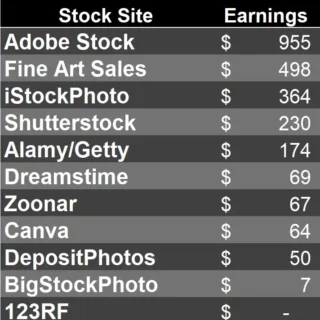
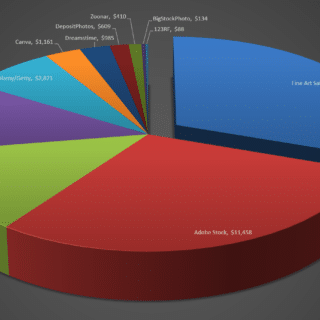
I started to upload to the various stock photography sites in early 2008. The sites are described below with a summary of how much I earned from each one in 2008.
Commissions for photographers start at 25 cents for each picture downloaded and after 500 dollars in earnings this bumps up to 33 cents each. This may not seem like much, but because of the monthly subscription style a much larger number of pictures are downloaded each day – I currently get an average of 6 per day on a portfolio of 200 photos, and have now moved into the higher per-download earning bracket. Occasionally, buyers will pay more – I have had some at $28.00, but not too many! I have found that you need to upload 10 pictures or so each weekend to keep the downloads steady. For some reason, their search system seems to favor newly updated portfolios. To be accepted as a member you have to submit 10 photos and have at least 7 of them approved. If you get less approved you will have to wait 30 days to try again. It took me two cycles to get approved – so this is one of the first sites to try and send in your best photos. Just make sure your pictures are nice and sharp and stock oriented. Shutterstock is extremely fun to be a part of because of the high number of downloads per day and high earnings. Shutterstock is extremely conscious of noise in your photos so shoot at low ISOs and if needed use noise reduction software – I use NoiseNinja. in 2008 I earned $550.
Buyers purchase credits which can then be used to download images. Images are priced based on the size the buyer wants to download (starting around $1 and going up from there). Standard members get a 20% commission on each sale, whereas exclusive members (meaning you only upload images to Istockphoto), get 25% to start and can work there way up to 40% as they sell more photos. I can’t see the logic for being exclusive on iStockPhoto as you can’t then upload to any other site. To apply you must upload 3 photos for review and if they approve your application you can begin uploading. If your application is denied you can try another 3 at anytime. Make sure your submission is 3 files of different types, so they can see your overall abilities. The only downside to Istockphoto is a somewhat cumbersome upload system when compared to FTP, but it is well worth it if you get a good photo that is popular as they pay more per picture than other sites. The program described at the end (DeepMeta) makes this process easier. When submitting images be sure to remove even the tiniest and seemingly un-noticeable logos or trademarks, because iStock is very critical of this. Minimum payout is $100. So far I have earned $291.53
This is a very professional site that earns well. Buyers also purchase credits and photos typically cost 1, 2, 3, and 4 dollars based on size. As a photo gets more sales, the price increases as well – it steps up for as little as 5 downloads. This means that you shouldn’t upload very similar photos as you could slow up the increase in download fee. Exclusive members get a 60% commission and standard members get 50%. There is no application review process so you can start uploading photos once signed up. Minimum payout is $100. Easy to upload to, and they accept most photos, although sometimes I get a hig rejection rate – maybe a different reviewer! In 2008 I earned $100.48.
Easy site to upload to – no application and good FTP approach. They are quite strict on the photos they accept. I have around 50% acceptance and it seems to be getting harder over time. Credits purchase images that start at $1 and go up from there based on size. They also have a subscription sale process which earns less. Once members have sold enough images they can set their prices to some extent. Commissions start at 33% for standard members and 50% for exclusive members. Both commissions go up as members sell more photos. I have earned $64.14.
Buyers can either purchase credits or by a one month subscription for $199. You must submit 5 images for initial application approval. If rejected then you have to wait 30 days to try again. Photographers get 50% commission or 30 cents for a subscription download. Minimum payout is $50. I got into this one without much trouble and they are reasonable easy on files. I still find the site quite complex! So far, I have earned $57.80.
Buyers purchase credits and files start in price at $1. Members receive a 50% commission and they have lots of different special licensing options. Things like licensing for your image to be on coffee mugs or T-shirts. These pay various amounts. Minimum payout is $30. Easy to upload to, and not too strict on acceptances. So far, I have earned $30.50.
Buyers purchase either credits or monthly subscriptions. Images start at 1 dollar or you can get a monthly subscription that allows 5 downloads per day for $89 or 26 downloads per day for $199. Members get a 50% commission or 36 cents for a subscription download. They require you to submit 10 images for initial approval. Minimum payout is $50. Pretty easy to get into although not a big earner and there is no hassle about uploading although you do have to assign a category to the photo. in 2008, I earned $31.54.
This doesn’t earn much, but it is easy to upload files to – just use the FTP and there are no special categories to add. You simply select the files, confirm that you own the copyright and click “submit”. In 2008, this earned $4.55!
General: I use a program called ProStockMaster to manage my keywording and uploads. It is well worth purchasing the Pro version as it helps come up with all the relevant keywords and also keeps track of which photos have been uploaded to which sites. For iStockPhoto, there is a different program that works well with the site – DeepMeta. This is free and helps with the complex keywording that iStockPhoto requires.
March 11, 2009
Seeing your work in print – big satisfaction
I’ve been involved in stock photography from about a year now, and have recently seen the first two examples of my work in print – the first on a vacation in Kauai, where I picked up a local guide book and saw one of my photos of Waimea Canyon on the main page of the guide book.
Then, on a recent flight on United, I opened the Hemispheres Magazine on the main index page, I saw a photo I took of the Jefferson Memorial surrounded by cherry blossoms. Great stuff!
March 7, 2009
Making money from writing “how to” articles
This is a surprisingly simple one. Sign up at ehow.com, and you can start to write short easy “how-to” articles. if you think about it, there are many topics you can write about – there are many things you probably take for granted, that you could explain to others. Depending on how many people log onto your articles, you will gain earnings, and the more articles you have written, the more you will earn. There is a list of articles that they are looking for on the site as well.
So far, I have written the following:
How to make money from stock photography
How to log onto a remote computer
How to copy an image on the screen
How to protect your computer from viruses
How to make money from home
How to make a lightbox for photos
How to figure gas mileage
How to construct a pergola
How to take good photos of your pets
Making money from your digital photographs
Modern digital cameras – especially SLR models with interchangeable lenses – give excellent quality images in a wide range of situations. If you are good at photography and can create sharp, well exposed images, then why not try to sell the photographs via stock photography sites?
I have written a short article about how to make money from stock photography here.
You can see some of my work in fine-art photography here – if you see something you like and want to buy a copy, please email me at sales @ steveheap.com (no spaces in the actual email address!)
Making money from content rich web sites
The key thing about a website is that it must have interesting content. A site that just lists a set of ads for unrelated items is unlikely to be visited very often. So pick a subject that you either know something about, or want to learn about. I chose the latter route, and decided that RFIDs (Radio Frequency ID devices or tags) were and coming topic and that people would be interested to learn about them, and, equally importantly, companies would be willing to pay for clicks on the adverts on the site. You can see how I have created a reference site for RFID activities here.
I spent a lot of time learning about how to create a web site in Dreamweaver, and how to drive the main part of the site from a database so that I could continue to update the site without having to alter the web pages. If that is beyond you, try building a site using Blogger or similar software. Remember that interesting and changing content is key!
Before you start, you need to get a good web site name – the URL. I find it is best to search for available names on www.netsol.com, but then actually register the name through 1and1.com. This hosting company is excellent and I host all my sites and email addresses through them – very reasonably priced as well!
Then you need to drive some content to the site – that means increasing the visibility of the site in Google’s search engine. There is a lot of secrecy about the exact mechanism for ranking sites, but it is based on the number and type of sites pointing to your site. So make a point of visiting as many forums and blogs related to your subject to write interesting comments on those sites, with a link back to your own site. Don’t just post boring entries – you do need to put some effort into the comments, and maybe readers on those sites will follow your links as well.
Finally, you can drive some traffic to the site yourself by paying for Ad-words. This is another Google product where you pay to place the small ads on other web sites. This is a nice way to get your site visible and visited, and I found that running the Ad-words for a month and then stopping was enough to get some traffic to my site.
Making Money from Home – First Steps
The site is all about making money from home from hobbies, activities and the things you enjoy. It is based on practical experience, and will help you avoid pitfalls and problems along the way. This “sticky” post covers the first important step to separate your personal finances from those of your new businesses – create a Limited Liability Company in your state or country. Why? Because you want to create a separate tax identity so that you can set various expenses against your income, and you also want to protect your own assets from any problems your new activities may cause. Check with a lawyer to be sure, but you can read a lot about creating an LLC on the web.
In my state, this was as easy as completing an application for a Federal Tax ID (on-line) and then creating the LLC via the State Registrar’s web site. In Virginia, this costs $50 per year, but is well worthwhile. This site can help with more information on the formalities of forming a partnership or limited liability company.
You will use the Federal Tax ID and company name when you sign up for various money making ventures.
There are a number of ways to earn money from a web site, but the easiest is asking Google to pay you. This is easy to do by signing up for Google Ad-sense. With this program, you can create a web site, add some interesting content (more on this below), and then place the code for Google’s Ads into the page. From that point on, Google will scan the rest of the site, and display appropriate ads alongside the text. There are various styles of banners you can choose, from graphical ones that run across the page, through to vertical ads running down the sides of the page. As an example of a site that earns money for me, check out this link.
Be careful to follow Google’s rules about placing ads on pages that have relevant content, and don’t be tempted to click on the ads on your own pages – they have ways of checking who is clicking on the ads!