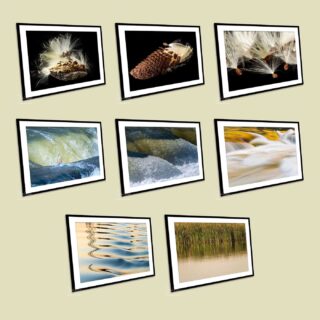
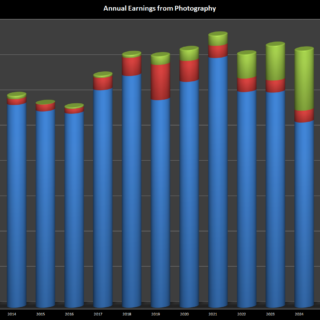
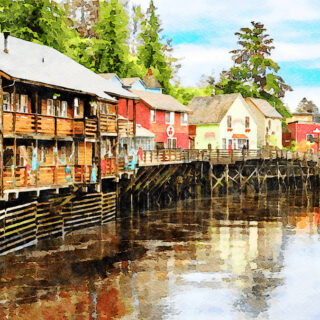
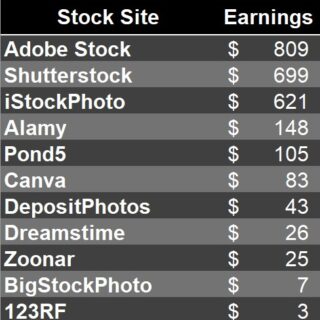
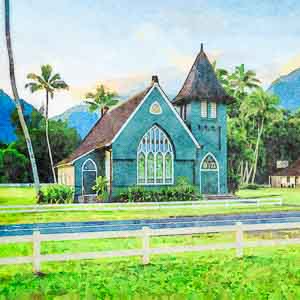
November has been a great month for stock photography – a total of $367 in sales. This was helped by $75 in video sales, and also a new site – DepositPhotos – which is paying stock photographers $0.02 per picture to upload, up to a maximum payout of $100. It will be interesting to see if it attracts buyers, but it is a relatively easy way to make $100!
I also spent a lot of time over the Thanksgiving Holidays at perfecting my use of indoor flash to create isolated images. I’ll add a blog entry when I get some time on how exactly I did this, but you can see some examples below in my latest photos on Shutterstock. If you decide to follow me in this hobby, please use my referral links which are in the headings of this article on Making Money from Stock Photography.
I mentioned, a few posts ago, that Jacqui was building a business making jewelry – with a focus on delicately encasing semi-precious stones with sterling silver wire. Her work is now for sale on an Etsy store and we maintained the Backyard theme by naming it BackyardArtisan.com! It is interesting to learn how best to make use of these stores – the search engine seems to favor newly entered items, and they are also displayed for a time on the landing page of the site. We found that the items got more page views in the few days after they were added for sale, and that slowly drops away over time. We made the mistake of entering all the items at once when the store was first set up, but now we add one item a week to maintain some status in the search process. The current plan is to try to get some traction on the site before Christmas.
The activity – which has since evolved to creating ornate and intricate bracelets – has led to an interesting opportunity though. Jacqui has been invited to become a teacher of wire-wrap jewelry at a local craft store. We will see how that develops.
A couple of weeks ago, I started work on displaying and offering my best photographs for sale using a web site created using a Smugmug Pro Account. That site, www.BackyardImage.com, is now 90% complete and I must admit that configuring the site does allow a lot of flexibility – certainly much more flexible that I was able to do with my own web site designs. I have the menu structure in place, have the basic design of each gallery straight, and have sorted out the pricing structure. Although the site is reasonably easy to use, each step did take a bit of research to get the right look for the website. I have tried both the available printers from SmugMug, and got good results from both. The site allows you to intercept a print order and create a properly sharpened and finished photograph to send to the printer, which is a great time saver – you can create images that look good on the web site and only work on those that actually sell to create a final, ready to print, image.
I want to do more on the site, but for now, it is public and available. All I now need to solve is how to get people to find it and buy some prints!
I mentioned in an earlier post – Creating an online photography website – that I have created a web site using Lightroom Galleries – a very clever use of the web gallery templates provided in Lightroom. This looks pretty smart, but two things are making me consider a change – one is that even if I enable the shopping cart, accepting credit cards is going to be complicated, and then I still have to organize all the printing and sizing of the prints assuming someone finds the site. It is pretty hard to make a personal web site appear near the top of a Google search!
Having looked at the alternatives – mainly Zenfolio, Photoshelter and Smugmug, I decided to go with Smugmug. A couple of things seemed to be important in that decision – I read some posts about people having been discovered through searches on their site and have sold prints that way, and then I found a 50% off coupon that I could use against a Pro package. The Pro package allows you to configure and customize the site to make it unique, and also allows you to sell prints at a profit.
I had printed a 20×30 inch photograph of Yosemite Valley seen over the Merced River and displayed it on the wall at work – a colleague on a visit to the office saw it and was interested in prints of this and other Yosemite photographs and that was enough to make me want to solve the problem! The new web site isn’t finished by any means, but it is on-line with Smugmug under the Backyard Image Fine-Art Photography label!
August has been a slow month for stock photography sales – I guess too many people on vacation! However, the stock videos I uploaded are going well. On Pond5, I sold 3 videos this month – for earnings of $75. I need to sell a lot of photos to get that amount of income, and the effort involved in uploading the videos is reasonable. I now have 30 video clips in my portfolio at Pond5. The other site I have uploaded to has not been just as successful – just $12.00 in August. Click here to see my stock video files at Shutterstock.
Just a week after uploading my initial videos to Pond5 and Shutterstock, I have had my first sale. It happens to be a video I created on the computer by zooming into a larger digital photograph of a foreclosure sign, but its moody and cloudy impression is obviously just what the buyer was looking for. The video sold for $50, of which I get $25. So a very good start to my adventure in stock footage sales.
Over the past couple of months, I have been working on creating a professional-looking web site to display my photographs and make them available for sale. I found an excellent solution with Lightroom Galleries – a set of templates that are imported into Adobe Lightroom’s Web module that create the underlying framework, the gallery or slide show pages, and, finally, a fully functional shopping cart system. Best of all – it is free!
It takes a little getting used to – although there is an excellent downloadable user guide – but is easy to use once the basics are understood. I have created my professional fine-art photography site – BackyardImage.com, although I haven’t managed to get the shopping cart functionality working just yet. My latest update of photographs was from my recent trip to Yosemite national park – hope you find the images stimulating!
I recently bought the Canon 5D Mark ii with the 24 – 105mm lens – fantastic camera for travel and stock photography, but also one of the first digital SLRs to record full screen HDTV movies with sound. To try it out, I have filmed a few swimming pool scenes and joined a new stock site – Pond5 – to see how the business works.
The Canon is pretty easy to operate in video mode, but a major initial step is to make sure that you have the latest firmware. Canon issued a new firmware release in June 2009 for the 5D that has a major advance in video production – the ability to manually set the aperture and shutter speed. The earlier firmware automatically adjusted these which removed a lot of control of depth of field in particular. The firmware is pretty easy to handle – download from the Canon site, load onto a compact flash and use existing menu commands to update the firmware – a 5 minute task. The other key things to do is to use a tripod. Video is very sensitive to movement and a handheld camera simply results in jerky and unprofessional video – use a solid tripod, and, if possible, a fluid head to allow smooth movements if you are panning across the scene.
I approached the filming by positioning my tripod and deciding what the key element of the scene would be. Most stock footage is between 7 and 20 seconds, and so the focal point must be clear. In my trials I used a pool waterfall and focused clearly on it at maximum zoom. Autofocus doesn’t work in video, and so an approach is to use autofocus when zoomed in and then turn off autofocus – the focus will stay where it is, and you can zoom out to the required composition. I also turned off the stabilization system as that isn’t helpful on a tripod. Then, in manual exposure mode, adjust the ISO, shutter speed and aperture to get the exposure correctly set. Use a higher shutter speed for moving objects, just as you would with a photograph. Then adjust the aperture so that the exposure is shown as correct in the viewfinder. Finally, move to live view, and start the video using the “Select” button. Be careful with any movements as they need to be very smooth, and avoid big changes in the distance of objects to the camera as it is set to manual focus at this stage.
Pond5 is easy on video formats with the Canon – they accept footage straight from the camera in MOV format. Other sites require encoding of the video, which I will cover in a different post. The trick now is to see if they sell!
Back in March, I wrote a series of “how to” articles at www.ehow.com. So far, I have written 9 articles, but unfortunately, although they have been viewed over 900 times, I have earned a total of $4.76. Not a great investment so far! I haven’t given up on this, and have recently added a new article about how to take great photographs of jewelry. At some level this is passive income, as the articles continue to be viewed, but it is disappointing so far.
One of the tasks to be tackled in selling jewelry is how to photograph it in a way that brings out the shape and the subtlety of the piece. As mentioned below, Jacqui has started to create beautiful silver wire-wrap jewelry by carefully encasing a cabochon – a shaped and polished semi-precious gemstone – in intricately shaped sterling silver wire. My job is to photograph them for her on-line sales web site.
If you look at the site, we have followed the approach of three variants for each piece. One is a picture of a lady wearing the pendant to show how it looks against skin, the second is against a black velvet background to bring out the colors, the third is to show an out of focus pastel colored background with the pendant seemingly floating in mid air. This last shot was made by using a glass topped coffee table, with an impressionist print on the floor about 12 inches below, and the pendant on the glass. I used two flashes on each side of the piece, one firing through a white umbrella, one reflected back from a silver umbrella a little further away. They give a broad enough swathe of light to properly illuminate the piece and the poster on the floor. With an f/8 aperture, I get a shallow depth of field to give the background a nice blurred impression. The result is shown below.